

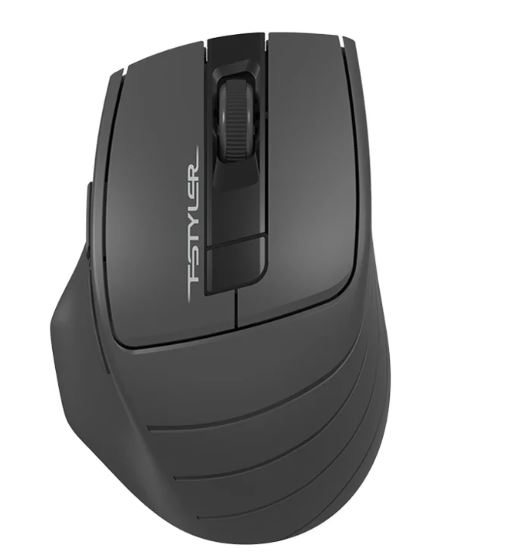
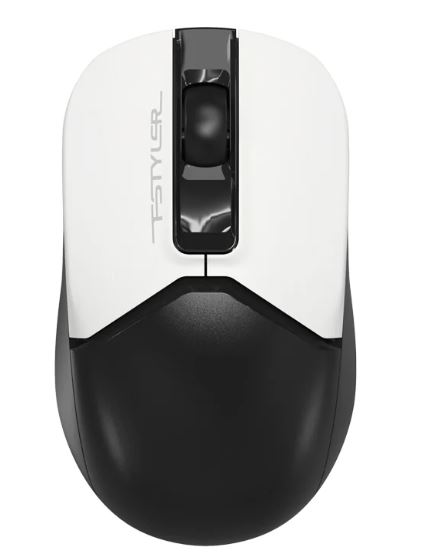
A4-Tech FG30S 2.4G Wireless Mouse
₨ 2,500
| Specification | Details |
|---|---|
| Brand | A4Tech |
| Model | FG30S |
| Type | Wireless Optical Mouse |
| Connectivity | 2.4GHz Wireless |
| Sensor | Optical |
| DPI | 1200 / 1600 / 2000 DPI |
| Buttons | 6 |
| Report Rate | 125Hz |
| Wireless Range | 10–15 m |
| Receiver | Nano USB Receiver |
| Battery | 1 × AA Alkaline |
| Click Type | Silent Click |
| Design | Right-Handed Ergonomic |
| Dimensions | 105 × 70 × 42 mm |
| Weight | 97 g with battery |
| Special Features | Power Saving, Anti-Slippery Side, 16-in-One Gestures |
Not every task needs the same cursor speed. Browsing calls for something relaxed, while detailed editing needs more control. The A4-Tech FG30S 2.4G Wireless Mouse handles both with a 3 level adjustable DPI setting, moving between 1000, 1600, and 2000. So sensitivity can match whatever you’re working on.
Wireless performance comes through a 2.4GHz connection with a nano USB receiver, giving a stable working range of up to 15 meters. There’s no repairing needed once it’s set up, just plug in the receiver and go.
Comfort during a full day at the desk often comes down to small details. Click noise gets reduced by as much as 90%. This makes it a solid pick for shared desks, quiet offices, or anywhere you’d rather not disturb the people around you. An anti-slippery side grip adds to the comfort. It keeps the mouse steady in hand during longer sessions, without feeling like it might slip.
Sixteen customizable gestures give you room to assign shortcuts for repetitive tasks, and an on and off power switch on the underside helps extend battery life when the mouse isn’t in use. Button durability is rated for 5 million clicks, so daily wear isn’t much of a concern.
It runs on a single AA battery and works with Windows systems from XP through 10.
Rounding out your setup? Browse our Mouse category or check keyboards that pair well with it. Full specifications are listed on A4Tech’s official FG30S page.


Reviews
There are no reviews yet.