Ask ten people about the Desktop Computer Price in Pakistan and you’ll get ten different answers. One cousin swears he got a great deal last month. A shopkeeper quotes you something else today. Then the dollar moves, and everything changes again.
So let’s sort this out properly. Below you’ll find realistic price ranges, the parts that really matter, and a few mistakes I see buyers make again and again.
Why People Still Buy Desktops
Laptops look nice and fit in a bag, no doubt. But for the same money, a desktop gives you a much faster machine. It’s also easy to fix. If your RAM fails, you swap one stick. If a laptop motherboard dies, you’re looking at a repair bill that makes you want to cry.
That’s why students, freelancers, small offices and gamers keep choosing a Desktop PC in Pakistan over a laptop. You can begin with a modest setup and keep improving it over time, adding RAM this year and a graphics card next year.
Desktop Computer Price in Pakistan by Use
Keep in mind that these are rough figures. Markets like Hafeez Centre in Lahore or Saddar in Karachi can quote differently on the same day, so treat these as a guide, not a fixed rate card.
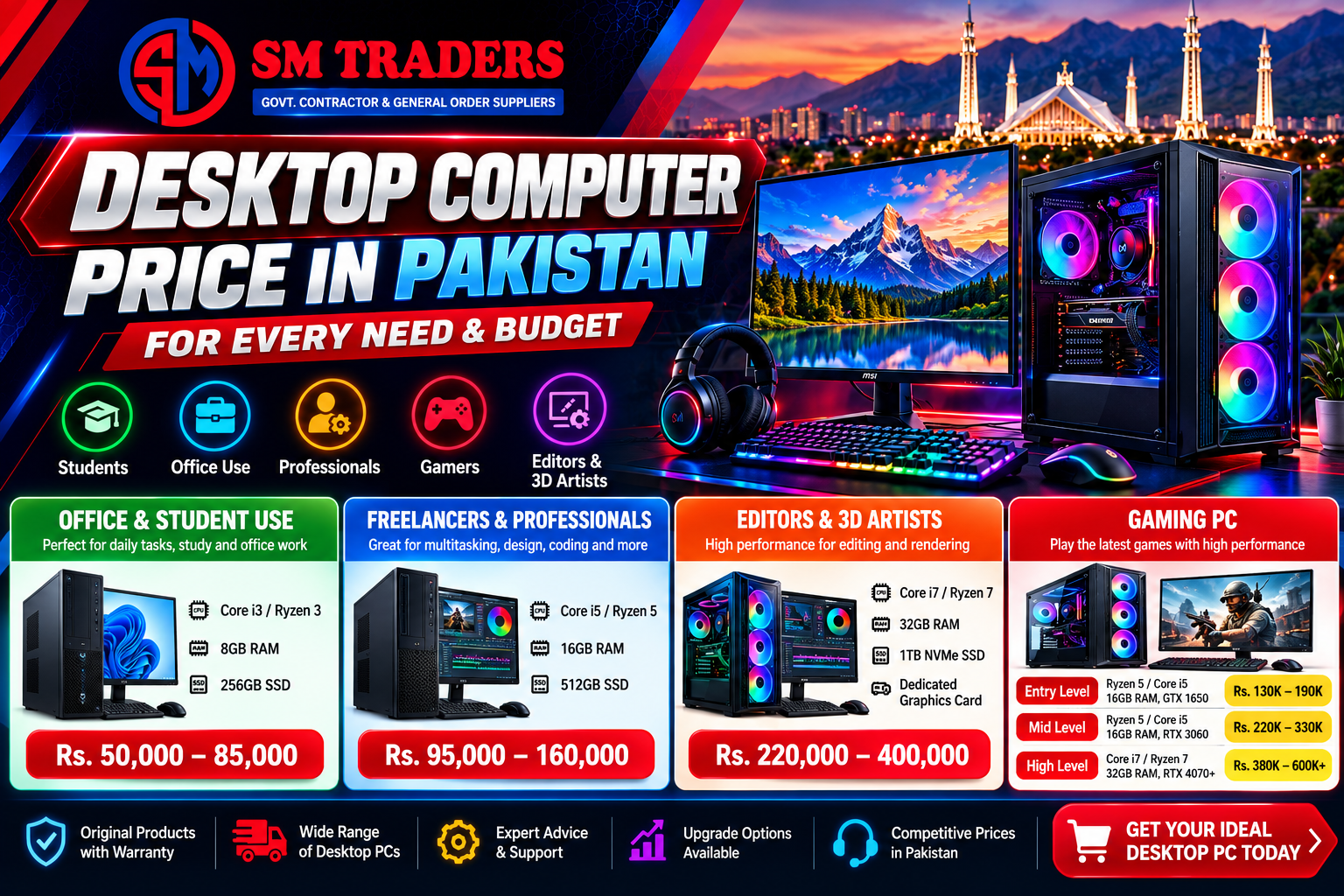
Office and Student Use
If you just need Word, Excel, YouTube, Zoom and a few browser tabs, you don’t need anything fancy.
- Specs: Core i3 or Ryzen 3, 8GB RAM, 256GB SSD
- Budget: around Rs. 50,000 to Rs. 85,000
Many buyers go for used Dell, HP or Lenovo units here. They’re tough machines, and honestly, for basic work nobody will notice the difference from a brand new one.
Freelancers and Professionals
Do you design logos, write code, run ads or edit the odd video? Then 8GB RAM will frustrate you quickly.
- Specs: Core i5 or Ryzen 5, 16GB RAM, 512GB SSD
- Budget: around Rs. 95,000 to Rs. 160,000
Most people should stop at this level. It handles heavy multitasking without any drama and doesn’t empty your wallet.
Editors and 3D Artists
Rendering 4K footage or working in Blender needs real muscle.
- Specs: Core i7 or Ryzen 7, 32GB RAM, 1TB NVMe SSD, dedicated graphics card
- Budget: around Rs. 220,000 to Rs. 400,000
Gaming PC Price in Pakistan
The Gaming PC Price in Pakistan depends mostly on one thing: the graphics card. That single part can cost more than the rest of the computer put together.
| Level |
Typical Build |
Approx. Price (PKR) |
| Entry |
Ryzen 5 / Core i5, 16GB RAM, GTX 1650 or RX 6500 XT |
130,000 – 190,000 |
| Mid |
Ryzen 5 / Core i5, 16GB RAM, RTX 3060 or RTX 4060 |
220,000 – 330,000 |
| High |
Core i7 / Ryzen 7, 32GB RAM, RTX 4070 or above |
380,000 – 600,000+ |
If you mostly play Valorant, CS2, Fortnite or GTA V, the entry build runs them fine at 1080p. Want the newest big-budget games on high settings? Aim for the middle tier.
One more thing. When a seller tells you the Gaming PC Price in Pakistan for a “complete setup”, ask what’s inside the case. A cheap power supply or a weak cooler can hide behind a nice RGB panel, and you won’t notice until something breaks.
Choosing the Best Desktop Computer in Pakistan
Let me be upfront: there’s no single Best Desktop Computer in Pakistan that suits everyone. A student and a streamer need completely different machines. What matters is matching the parts to your work.
Processor. Core i3 or Ryzen 3 is plenty for daily tasks. For serious work, start from Core i5 or Ryzen 5. Don’t pay for an i7 unless your software actually needs it.
RAM. Think of 8GB as the minimum these days. 16GB feels comfortable, and 32GB makes sense only for editing or rendering.
Storage. Please don’t buy a PC with only a hard drive in 2026. An SSD changes everything, with Windows booting in seconds. Get a 512GB NVMe drive and add a cheap hard disk later for old files and movies.
Graphics card. Office users can skip it, since integrated graphics will do. Gamers and editors should put a good chunk of their budget here.
Power supply and cooling. This is where people cut corners and regret it later. With the load shedding and voltage swings we deal with, a decent PSU and a UPS or stabilizer are not optional extras.
Branded or Assembled?
Branded PCs from Dell or HP come with warranty and a neat, ready-to-use package. The downside is you pay extra, and upgrading can be awkward because of custom parts.
Assembled PCs give you more speed per rupee, and you choose every part yourself. For gaming or creative work, I’d go assembled almost every time. The only condition is a seller you trust, one who gives a proper warranty on each component and not just a handwritten slip.
Smart Buying Tips
- Decide your budget first. Otherwise the seller will decide it for you.
- Ask at least three shops. The same RAM or SSD can differ by a few thousand rupees.
- Check the warranty. One year is the minimum on the processor, motherboard, RAM and graphics card.
- Skip the extras you don’t need. A fancy glass case won’t make your game run faster.
- Pick a motherboard with room to grow. That way you can upgrade the CPU or RAM later.
- Count the accessories. A monitor, keyboard, mouse and UPS can add 30,000 rupees or more to your final bill.
Should You Wait for Prices to Drop?
Honestly, waiting is a gamble. Hardware prices follow the exchange rate, and nobody can predict that. If you need a computer for work or classes right now, buy it and upgrade later. Waiting three months while losing work costs more than any small price drop will save you.
Gamers have a slight advantage, though. When a new graphics card launches, the older ones usually get cheaper, so last year’s model can be a real bargain.
Wrapping Up
Here’s the quick version. Basic office systems start near Rs. 50,000. A solid Desktop PC in Pakistan for professional work lands between Rs. 95,000 and Rs. 160,000. The Gaming PC Price in Pakistan can run from Rs. 130,000 all the way past Rs. 600,000, depending on how much power you want.
Whatever you pick, get an SSD, enough RAM and a trustworthy power supply. Do that and you’ll end up with the Best Desktop Computer in Pakistan for your own needs, and a fair Desktop Computer Price in Pakistan to go with it. Compare a few shops, confirm today’s rates, and always keep the warranty card safe.